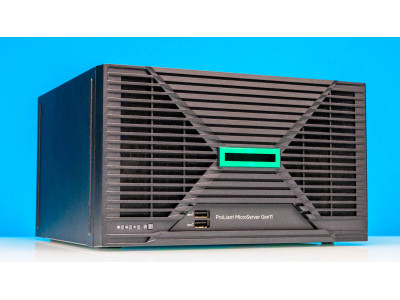
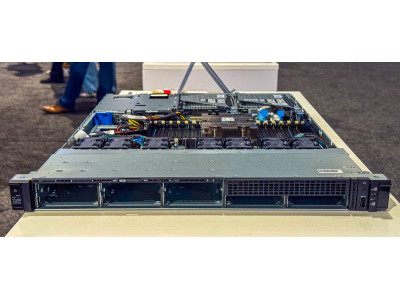
In short. Gen11 on AMD EPYC 9004 comes in four platforms: single-socket DL325 (1U) and DL345 (2U), dual-socket DL365 (1U) and DL385 (2U) — up to 96 cores per processor, twelve DDR5 channels and PCIe Gen5. In the ITsmart catalogue DL365 Gen11 and DL385 Gen11 start at 48,000,000 UZS, while DL325 Gen11 10SFF is priced on request. The practical constraints are not in the CPU: memory has to be populated across all twelve channels per socket, and top-bin EPYCs at 360–400 W in a 1U chassis need a cooling calculation of their own.
All ProLiant Gen11 configurations with prices → — what is available and what a build for your workload costs.
While the market watches Gen12, the HPE ProLiant Gen11 line on AMD EPYC "Genoa" (9004 series) remains the best balance of price, firmware maturity and availability. These are the platforms that actually ship into projects in Tashkent today: lead times are predictable, hypervisor compatibility is proven, and the price per core is lower than on the newest generation. Below is the model line and the differences that matter in practice — not the marketing table, but the details that surface during installation.
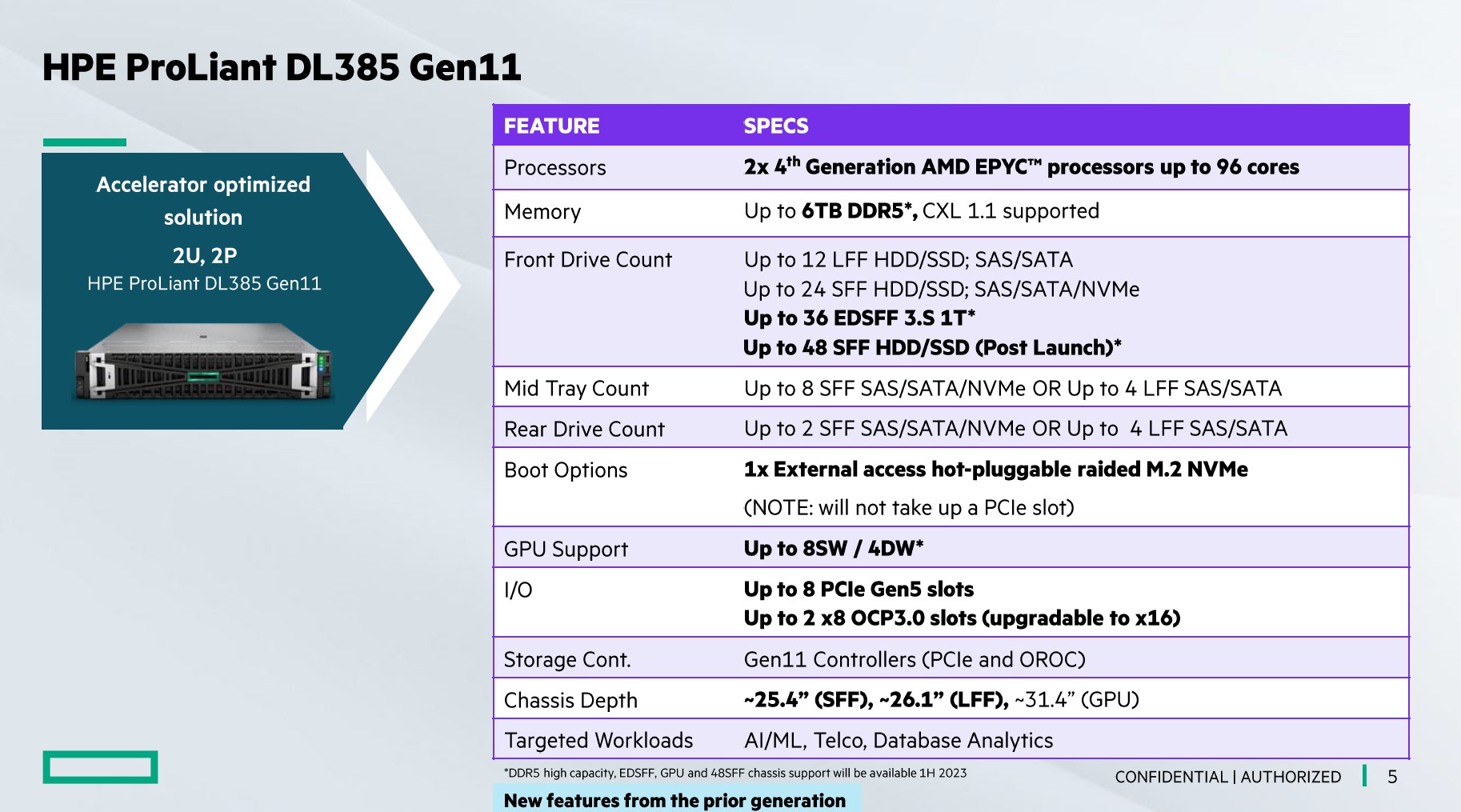
The Gen11 AMD EPYC line-up
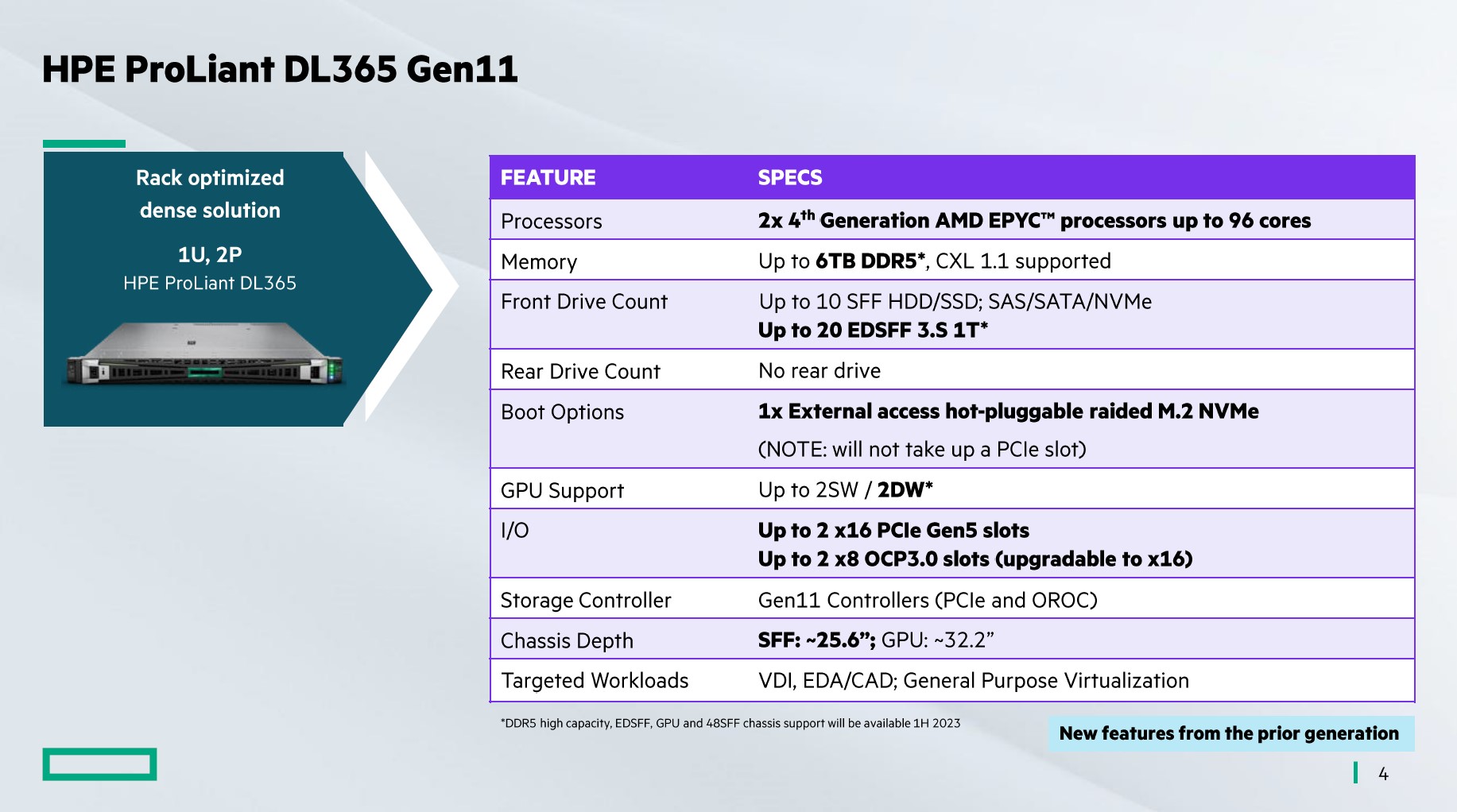
| Model | Form factor | Sockets | Cores (max) | DIMM slots | Notes |
|---|---|---|---|---|---|
| DL325 Gen11 | 1U | 1 | up to 96 | 24 | up to 3 TB RAM, PCIe Gen5 — a dense single-socket node |
| DL345 Gen11 | 2U | 1 | up to 96 | 24 | same processor, more room for drives and cards |
| DL365 Gen11 | 1U | 2 | up to 192 (384 threads) | 24 | two 96-core CPUs in 1U — maximum density per rack unit |
| DL385 Gen11 | 2U | 2 | up to 192 (384 threads) | 24 | headroom in cooling and expansion slots |
Note the DIMM column. The single-socket DL325 and DL345 carry the same 24 slots as the dual-socket models, because each EPYC socket has twelve memory channels with two DIMMs per channel. On the dual-socket DL365 and DL385 those 24 slots are split between two processors — twelve each, one module per channel. That is not a typo in the datasheet but a layout consequence, and it directly shapes how you size memory.
Memory: why all twelve channels have to be filled
EPYC 9004 has twelve DDR5 channels per socket, and the memory controller only performs at full rate when all twelve are populated. The classic purchasing mistake is ordering eight 32 GB modules "the way we always did on Xeon": the capacity is the same 256 GB, but bandwidth drops by roughly a third, and on memory-sensitive workloads — analytics, large databases, dense virtualisation — that shows up immediately in benchmarks.
The correct approach is twelve identical modules per processor, matched in capacity, speed and rank. For a dual-socket DL385 that means 24 modules. Hence the practical configurations: 12 × 16 GB = 192 GB, 12 × 32 GB = 384 GB, 12 × 64 GB = 768 GB per socket. DDR5-4800 speed holds at one module per channel; filling two DIMMs per channel on a single-socket platform lowers the clock — capacity up, speed down, a deliberate trade-off.
One more detail: modules of different rank must not be mixed within a processor, as the controller levels everyone down to the worst one. If memory is added a year later, order the same part number rather than "the same capacity".
Storage layout and controllers
Drive layout is the second thing people get wrong at order time. On Gen11 the backplane is chosen at build and can only be changed later by stripping the chassis, so the decision has to be made up front:
- 1U (DL325, DL365) — 8 or 10 SFF bays. The 10-bay variant is designed for NVMe attached directly to the processor, with no RAID controller in the path.
- 2U (DL345, DL385) — from 8 to 24 SFF, or 12 LFF. A 24-SFF build needs two or three backplanes and therefore extra cabling and an adapter with more ports.
- Controllers — the MR/NS range, from the NS204i-u boot device (two mirrored M.2 for the hypervisor) to the MR416i with 8 GB cache for large arrays. Tri-mode keeps SAS, SATA and NVMe on one adapter, but NVMe through a controller is slower than direct attach.
A practical rule: hypervisor on a separate mirrored M.2 pair, data on the main array. That avoids the situation where rebuilding the data array degrades the hypervisor itself. RAID levels and the usual mistakes are covered separately in RAID and the server disk subsystem.
Power and cooling: what a 400 W socket demands
Top-bin EPYC 9004 parts have a TDP of 360–400 W. Two of them in the 1U DL365 chassis means 800 W for CPUs alone, before memory, drives and adapters. Three consequences follow, all of them worth settling before the order:
- Power supplies. Top configurations take 1600–1800 W units, always in a redundant pair — here redundancy is not a luxury but a condition of running at peak load.
- Room temperature. For dense 1U builds HPE caps the inlet temperature: at 30–35 °C the top processors in 1U are either unsupported or require the high-performance fan kit. In Tashkent server rooms cooled by domestic split units this is a real risk — in summer, half an hour after the air conditioner fails the limit is gone.
- Noise and rack placement. A 1U with high-RPM fans runs at 75–80 dB. If the server lives in an office or a storeroom rather than a proper server room, the 2U DL385 with larger fans will be both quieter and cooler at the same configuration.
The conclusion: unless rack units are genuinely scarce, put top-bin processors in 2U. The density advantage of 1U is eaten by climate requirements and TDP limits.
What is in the catalogue and what it costs
| Platform | Processor | Form factor | Price |
|---|---|---|---|
| DL325 Gen11 10SFF | AMD EPYC 9004 | 1U, 1 socket | on request |
| DL365 Gen11 | AMD EPYC 9004 | 1U, 2 sockets | from 48,000,000 UZS |
| DL385 Gen11 | AMD EPYC 9004 | 2U, 2 sockets | from 48,000,000 UZS |
| DL360 Gen11 | Intel Xeon Scalable | 1U, 2 sockets | from 40,000,000 UZS |
| DL380 Gen11 | Intel Xeon Scalable | 2U, 2 sockets | from 49,000,000 UZS |
Prices are for base configurations and move with processors, memory and drives — the final figure is built around the workload. The Intel models are listed for comparison: with chassis prices this close, the difference lands on processors and licences, and it has to be counted together with the software. The full costing method is in how much a server costs in Tashkent, and the platform comparison itself is in AMD EPYC or Intel Xeon.
The Arm option: ProLiant RL300 Gen11
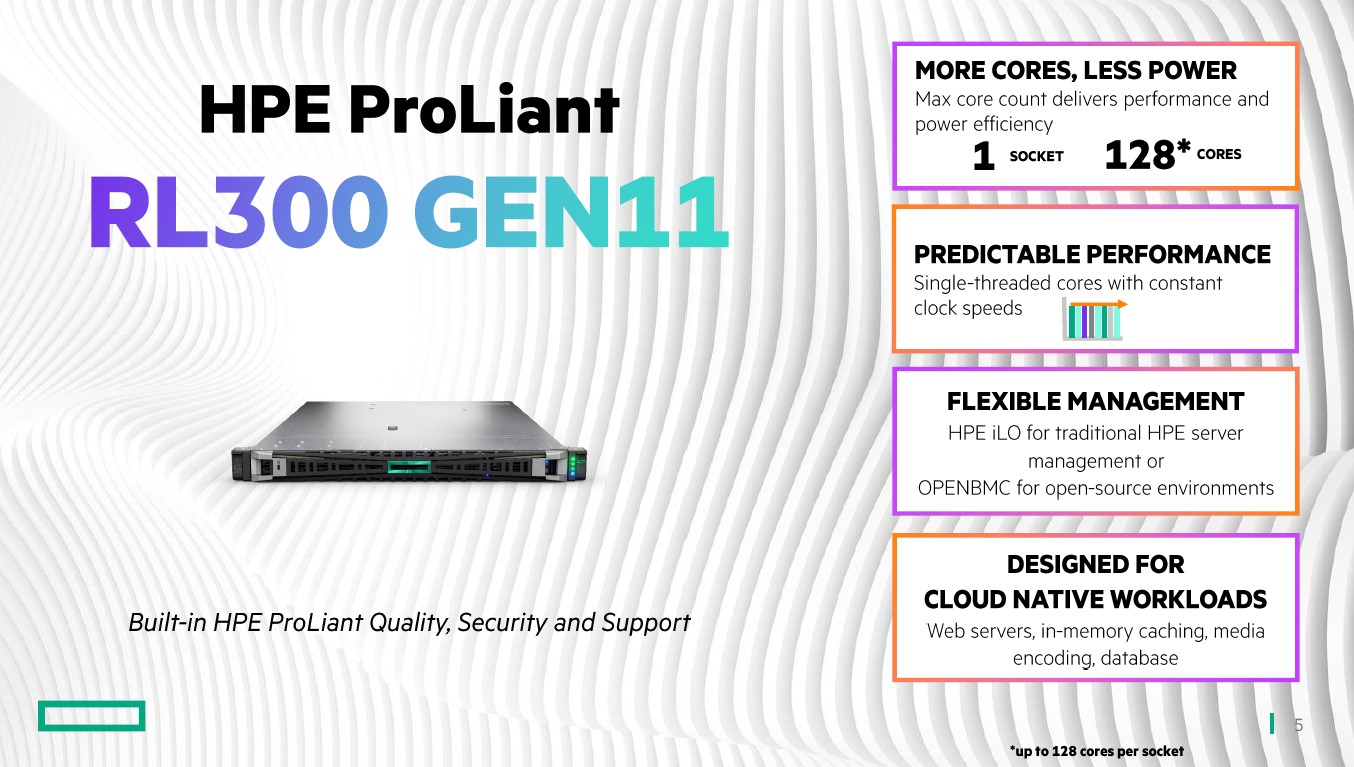
The family also includes the RL300 Gen11 on Ampere Altra Max — an Arm server with a high count of power-efficient cores. The niche is narrow but clear: cloud-style scale-out workloads — web, microservices, containers — where density per watt matters and the software is already built for Arm. Compatibility has to be checked in advance across the whole stack: hypervisor, backup agent, monitoring agent, adapter drivers. If even one component exists only for x86, the electricity savings will not pay for rewriting the plumbing.
Moving from Gen10 Plus: what carries over and what does not
A common scenario: a new Gen11 goes in next to a working DL325 Gen10 Plus v2, the workload migrates, and the old server becomes a spare or a test box. What to know in advance:
- Memory does not carry over. Gen10 Plus is DDR4, Gen11 is DDR5. The modules are physically incompatible.
- Drive carriers are different. Drives from a Gen10 Plus will not fit a Gen11 chassis without new carriers, which have to be ordered with the server.
- Management changed. iLO 5 on Gen10 Plus, iLO 6 on Gen11: the interface and parts of the API differ, so automation scripts and monitoring templates need checking.
- Different socket. SP3 on Gen10 Plus against SP5 on Gen11 — the CPU cannot be moved.
- What does carry over. OCP and PCIe network adapters, optics and DAC cables, rack rails (partly, depending on depth), and management licences where versions match.
Live migration between Gen10 Plus and Gen11 within the same CPU vendor is possible with cluster compatibility mode enabled (EVC on VMware, the equivalent on Proxmox), at the cost of levelling down to a common instruction set. Mixing AMD and Intel in one cluster is not possible in any mode.
How to choose
- Single-socket DL325 and DL345 — when density and savings matter: one such server often replaces a pair of older dual-socket machines, cutting both power draw and per-socket licensing.
- Dual-socket DL365 and DL385 — for heavy virtualisation, large databases and the maximum number of cores in one chassis.
- DL385 (2U) — the default choice for an ordinary server room: headroom in cooling, slots and drives on the same processor base as the 1U.
- DL365 (1U) — when rack units are scarce and the room climate is genuinely controlled, not by a domestic air conditioner.
Checklist before ordering
- Is memory specified as twelve modules per processor, or does the configuration lose a third of its bandwidth from day one?
- Is the backplane chosen for the required number of drives? Changing it later means stripping the server.
- Is there a separate boot device for the hypervisor (NS204i-u or a mirrored M.2 pair)?
- Does the room hold the inlet temperature year-round, with margin for an air-conditioner failure?
- Do the UPS and rack power groups have the capacity? A pair of 1600 W supplies is not a load for a household extension lead.
- Does the platform match what is already in the cluster? AMD and Intel cannot be mixed in one virtualisation cluster.
Gen11 on EPYC 9004 means mature firmware, broad availability and, as a rule, the best performance per dollar available right now. We will build a configuration for your workload, calculate power and cooling, and compare it with Gen12 if you are planning a five-year horizon — get in touch. Platforms with prices are in the Servers section and in the ProLiant Gen11 selection.
Source and photographs: ServeTheHome, Cliff Robinson, 01.11.2022 — servethehome.com. Published with attribution.
Questions and answers
How does the DL365 differ from the DL385?
The processor base is identical — two SP5 sockets for EPYC 9004. The difference is the chassis: DL365 is 1U, DL385 is 2U. The 2U has more drive bays (up to 24 SFF against 10), more expansion slots and substantially better cooling, which matters for processors at 360–400 W TDP. Take the 1U only when rack density is critical.
How many memory modules should a Gen11 EPYC server have?
Twelve per processor, matching the number of DDR5 channels. An eight-module configuration will run, but loses about a third of its memory bandwidth. For a dual-socket server that means 24 identical modules.
Can drives and memory be moved from an old DL325 Gen10 Plus?
Memory, no: Gen10 Plus runs DDR4 and Gen11 runs DDR5. Drives can be moved, but new-style carriers are required and should be ordered with the server. Network adapters, optics and DAC cables transfer normally.
What if there is only one free rack unit?
The DL325 Gen11 — a single-socket 1U platform with up to 96 cores and 3 TB of memory. In total throughput it replaces a dual-socket server of the previous generation, and under per-socket licensing it costs half as much. If two sockets in one unit are genuinely required, the DL365 Gen11 — after checking the room climate.