In short. A meeting room system is chosen by the distance to the farthest participant, not by camera resolution: up to four metres a Poly Studio X30 video bar with 4.5 m pickup is enough, up to seven or eight metres you need a Studio X50 with directional microphones and 7.5 m pickup, and beyond that a Studio X70 with two cameras or external microphones. Native Teams Rooms mode requires a separate room licence; USB mode works with any service. Connect the room by cable, and a second display matters more than a 4K camera.
Meeting room equipment is usually chosen on two parameters: price and camera resolution. Neither has much bearing on the outcome. The difference between a good room and a bad one shows up elsewhere: remote participants either hear the person in the far corner or ask them to repeat every sentence; a meeting either starts with one button or burns five minutes hunting for a cable. Here is what actually decides it.
Start here: room size and scenario
First, the floor area and depth. The key figure is not camera resolution but the distance from which the microphones pick up speech intelligibly. A room for four to six people needs about four metres of pickup radius, a room for ten to fourteen needs twice that, and a boardroom needs either directional microphones or external microphone arrays.
Second, who runs the meetings. If the company lives in Microsoft Teams, the device should work in native Teams Rooms mode: it wakes on the calendar schedule and participants join with one touch. If meetings happen in Zoom, in Teams and in customers' own services, versatility matters more: switching modes or acting as a USB camera for a laptop.
Three classes of solution
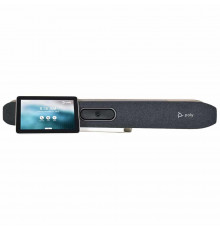
All-in-one video bar. Camera, microphones and speakers in one enclosure above or below the display. The most common option for rooms up to fifteen people: one box, one power cable, minimal installation. The Poly Studio X line belongs here.
Modular system. A separate codec with camera, microphones and displays attached. More flexible in large rooms: the camera goes where it is needed and microphones spread across the table. Examples are the Cisco Webex Room Kit and the Room Kit Pro for large spaces.
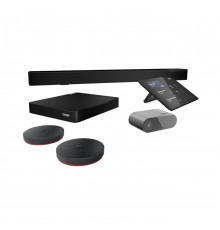
A kit built on a mini PC. A certified computer with a touch controller, to which camera and audio are chosen separately — for example the Lenovo ThinkSmart Core. This suits anyone who wants to assemble a room from components without being tied to one peripheral vendor.
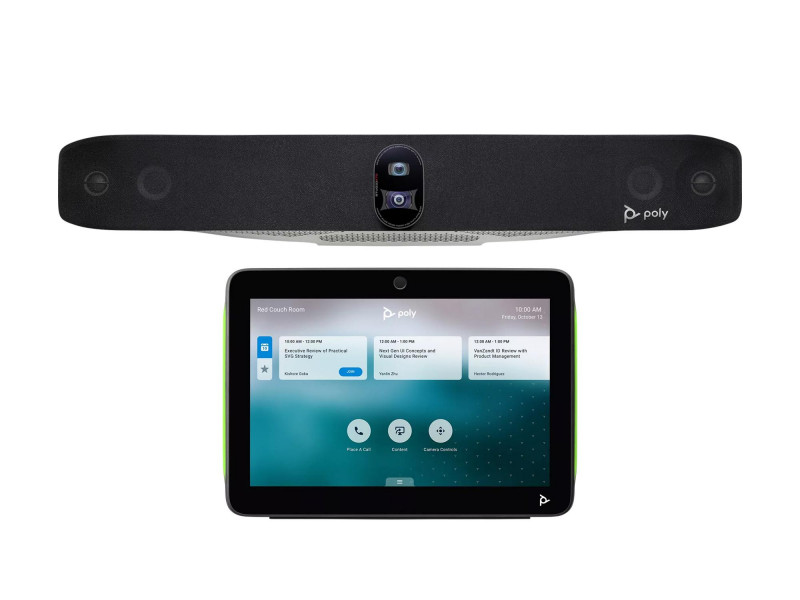
Poly Studio X30, X50 and X70: the differences
| Parameter | Studio X30 | Studio X50 | Studio X70 |
|---|---|---|---|
| Room size | small, 4 to 6 people | medium, up to 10 to 12 | large, boardroom |
| Camera | 4K/30, 120° field of view, 4x zoom | 4K/30, 120° field of view, 5x zoom | two 4K+/30 cameras, 120° and 70°, 7.3x zoom |
| Microphones | 4 MEMS | 2 MEMS plus 2 cardioid | 2 MEMS plus 2 cardioid |
| Audio pickup range | about 4.5 m | about 7.5 m | about 7.5 m, more with external microphones |
| Displays | one | two | two |
| Speakers | mono | stereo | stereo with bass ports |
Note that the gap between the X30 and the X50 is less about the camera than about audio and display count. That is exactly why an X30 disappoints in a large meeting room: the picture is decent while the far end cannot make out distant speakers. The X70's second, narrower camera serves a different purpose — a close-up of the speaker in a deep room, where a wide-angle frame turns people into silhouettes.
What matters besides the camera
Echo and reverberation. Glass walls and a bare table produce a boomy echo that no processor fully removes. Carpet, curtains or acoustic panels improve intelligibility more than moving up a model.
A second display. One display forces a choice between the presentation and the faces. In a room where documents are shown regularly, the second display changes the experience more than camera resolution does.
Auto-framing. The feature that finds the speaker and adjusts the frame to the number of people present. In rooms deeper than five metres it is a necessity, not a garnish.
Lighting. A window behind the participants turns them into dark silhouettes with any camera. Light should fall on faces, not into the lens.
Operating modes: native and USB
Poly Studio X devices work two ways, and it is worth understanding the difference before buying.
In native mode the Teams or Zoom application runs on the device itself. The room stands alone: meetings appear from the calendar, joining is one touch on the controller and no laptop is needed. This requires the corresponding room licence from Microsoft or Zoom — a separate budget line that buyers often discover after the purchase.
In USB device mode the video bar connects to a laptop by cable and behaves as a good webcam with a microphone: it works with any service, including those without native support. The downside is that it needs a laptop and its owner, and the start of the meeting depends on whether the cable turns up.
The practical approach: native mode for rooms with daily meetings, USB for flexible spaces and small offices.
Infrastructure: what people remember on installation day
A network socket beside the display is not an obvious item during a refit, and pulling cable across the wall of a finished meeting room is unpleasant. Conferencing devices need wired networking: over Wi-Fi quality drifts with the state of the air, and that is the first cause of "freezing" in meetings. We cover choosing office access points separately, but a meeting room belongs on a cable.
Then mounting height: a video bar goes at the eye level of seated participants, usually just below the display. Too high and everyone looks up at the camera; too low and it films the tabletop. And the bracket: order the mount for your specific model and display together with the equipment, or installation slips by a week.
How to choose in five minutes
Measure the distance from the device to the farthest participant. Up to four metres, a compact video bar will do. Up to seven or eight, you need a model with directional microphones and stereo sound. Beyond that, a two-camera system or external microphones. Then decide whether a second display is needed and settle the mode: native with a room licence, or USB.
To size a package for a specific room, including acoustics, mounting and licences, write to us. The equipment is in the video conferencing section.
Questions and answers
Can a webcam and a speakerphone do the job?
In an office for three people, easily. Problems begin with distance: an ordinary webcam has a narrow field of view and an inexpensive speaker does not suppress echo, so the far end hears a boomy room. The boundary sits roughly where the table stops being within arm's reach.
Is a separate Teams or Zoom licence required?
For native mode, yes — the room licence is bought separately from the hardware. In USB device mode an ordinary user account on the connected laptop is enough.
What if the meeting room is long and narrow?
That is the worst case for a wide-angle camera: distant participants look tiny and near ones are distorted at the edges of the frame. The answer is a device with optical zoom and auto-framing, or a second narrow-angle camera as on the Studio X70. Microphones in such a room are almost always external.