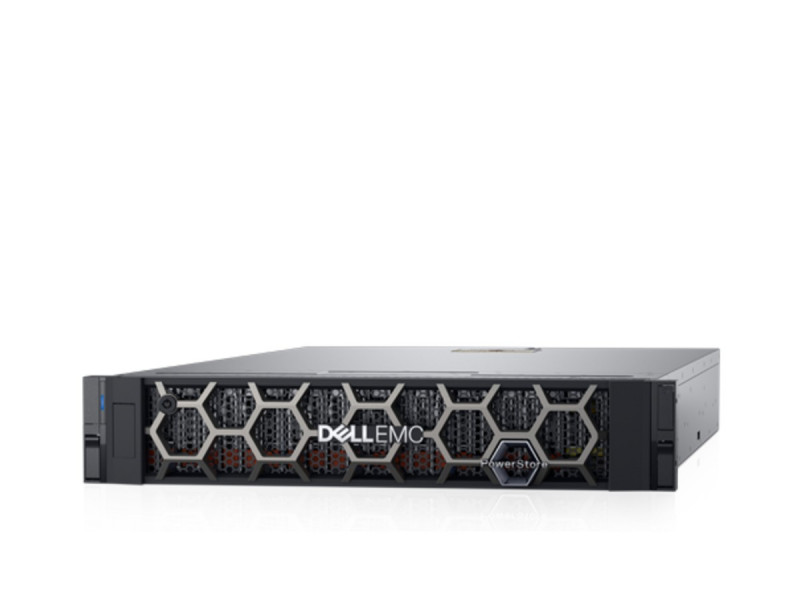
In short. Choosing storage comes down to four decisions, taken in this order: access type (block for virtualisation and databases, file for documents), interface (SAS is cheapest, iSCSI most flexible, Fibre Channel most predictable under load), media (all-flash for latency, hybrid for capacity) and headroom for growth. In the ITsmart catalogue an entry SAS array starts at 26 003 000 UZS, the same class with iSCSI at 93 084 000 UZS and with Fibre Channel at 88 277 000 UZS. The gap between SAS and FC in an identical chassis is the price of the storage network, not of the disks.
Storage systems in the catalogue with prices →
Jump to: block or file access · SAS, iSCSI or Fibre Channel · all-flash or hybrid · storage for virtualisation · compression and dedup · resilience · planning for growth · catalogue prices · checklist · questions and answers
Start with the access type
- Block access (SAN). The array hands the server a "disk" and the server creates the file system on it. That is how hypervisors, databases and clusters work. Protocols: SAS, iSCSI, Fibre Channel.
- File access (NAS). The array hands over a ready network share over SMB or NFS. That is how file archives, shared documents and backups work; permissions and the file system live on the storage side.
The rule of thumb: storage for a hypervisor or a database is block storage; storage for users' documents is file storage. Many arrays do both, but paying for that only makes sense when both scenarios are genuinely needed.
A note on NAS: in a small office an ordinary server with disks and a properly built RAID often covers the file-storage role — cheaper than a separate array and simpler to run. Levels and rebuild arithmetic are in our RAID and disk subsystem guide.
SAS, iSCSI or Fibre Channel
| Interface | Servers attached | What else is needed | When it is chosen |
|---|---|---|---|
| SAS | usually 2–4 directly | cables and HBAs only | One or two servers beside the rack; the cheapest entry |
| iSCSI | as many as the network carries | 10/25G NICs and dedicated switch ports | A virtualisation cluster with no separate storage fabric |
| Fibre Channel | dozens | FC HBAs and FC switches | Predictable latency under load, large clusters |
The classic iSCSI mistake is running storage traffic through the same switch and the same ports as ordinary traffic. While the load is light everything works; during a backup window latency climbs and databases "slow down for no reason". iSCSI wants dedicated ports — better still a dedicated switch — and jumbo frames end to end. Which cards and transceivers that takes is covered in our network cards and transceivers article.
The catalogue shows the cost of that choice: an MSA 2060 SAS with 12 bays is 30 257 000 UZS, the same chassis with iSCSI 93 084 000 UZS and with Fibre Channel 88 277 000 UZS. Same disks, same chassis — the difference is the controllers and what you can attach.
All-flash or hybrid
- All-flash when latency matters: databases, terminal servers, virtual desktops. What counts here is response time and operations per second, not megabytes.
- Hybrid when there is a lot of data and only a few per cent of it is hot: file archives, backups, video surveillance. Cost per terabyte decides.
The hybrid trap is that automatic tiering is not instant. If the workload changes daily the data never gets warm, and the array keeps answering at the speed of the slow tier. For such profiles it is more honest to buy a smaller all-flash array.
Cost per terabyte from the catalogue: an Intel D3-S4520 7.68 TB SSD is 10 782 352 UZS, a WD Ultrastar 22 TB SAS drive 8 625 882 UZS. The per-terabyte gap, not the datasheet speeds, is what drives the decision.
Storage for virtualisation: what to size
- Operations per second, not capacity. Twenty virtual machines with databases generate random I/O that high-capacity HDDs cannot serve in any quantity.
- The path to the array. Two paths from each server, two controllers in the array, multipathing configured on the hypervisor. One cable or one controller is not a resilient cluster — it is an expensive single point of failure.
- Headroom for snapshots. Snapshots live on the same array and consume capacity faster the more the data changes. Do not plan past 80 % utilisation.
Compression and deduplication
Deduplication pays off where data repeats: a dozen identical virtual machines, backups, images. On unique data — photos, video, already-compressed archives — it returns almost nothing while spending CPU time.
The other thing people forget: vendor ratios are measured on profiles that suit the vendor. Never size capacity on a ratio from a slide deck — size on raw capacity and treat any saving as a bonus. If the data does not compress, you run out of space at the worst possible moment.
Resilience: what to check
- Two controllers — actually installed, not merely "supported". An array with one controller is a server with external disks.
- Two paths from every server with multipathing configured. Verify by unplugging a cable on a test bench, not on paper.
- Two power supplies on two independent feeds, not two cables into one power strip.
- A hot spare in the chassis so a rebuild starts on its own. Why that matters is in the RAID guide.
- Protection level. On high-capacity drives that means RAID 6 or the vendor's equivalent: rebuilding a 16–22 TB drive leaves the array without redundancy for nearly two days.
Planning for growth
Look at the expansion shelf, not just the chassis. MSA and PowerVault grow by shelves, but the shelf must match the generation and the shelf count is limited by firmware. The rules are in our HPE MSA and Dell PowerVault references. In the catalogue an MSA 2050 SAS 12LFF shelf is 24 800 000 UZS and a Dell PowerVault MD1400 is 33 000 000 UZS.
Count more than terabytes. Adding servers runs into controller host ports, and adding load runs into controller performance. An array out of host ports can only be expanded by replacing the controllers — in practice, by buying a new array.
Catalogue prices, September 2026
| Model | Interface and bays | Price |
|---|---|---|
| HPE MSA 2060 SAS 24SFF | SAS, 24 × 2.5″ | 26 003 000 UZS |
| HPE MSA 2060 SAS 12LFF | SAS, 12 × 3.5″ | 30 257 000 UZS |
| HPE MSA 2060 iSCSI 12LFF | iSCSI, 12 × 3.5″ | 93 084 000 UZS |
| HPE MSA 2060 FC 12LFF | Fibre Channel, 12 × 3.5″ | 88 277 000 UZS |
| HPE MSA 2062 SAS 12LFF | SAS, two SSDs included | 84 238 000 UZS |
| Dell PowerVault ME5012 FC 12LFF | Fibre Channel, 12 × 3.5″ | 117 419 000 UZS |
| HPE MSA 2050 SAS 12LFF shelf | expansion shelf | 24 800 000 UZS |
| Dell PowerVault MD1400 | SAS expansion shelf | 33 000 000 UZS |
MSA configurations by generation are in our HPE MSA 2060 and 2062 collection; the Dell line is in PowerVault ME5.
Checklist before buying
- Block or file access — everything else follows from it.
- How many servers attach today and in three years: SAS limits growth before capacity runs out.
- Whether iSCSI has dedicated ports and jumbo frames enabled.
- Two controllers, two paths, two independent power feeds — in fact, not in the datasheet.
- Protection level on high-capacity drives: RAID 6 or equivalent, plus a hot spare.
- An expansion shelf of the same generation, and the firmware limit on shelf count.
- Capacity sized on raw terabytes with no assumed compression, planned to no more than 80 % full.
- A backup outside the array: replication and snapshots are not backups.
We will size the array against your workload — operations, paths, shelves and growth headroom — and say plainly if a server with disks solves it more cheaply than a dedicated array. Get in touch.
Questions and answers
What is the difference between SAN and NAS in plain terms?
SAN presents a block device — a "disk" — on which the server builds its own file system; that is what hypervisors and databases need. NAS presents a ready network share over SMB or NFS, with the file system living on the storage side; that is what shared documents and archives use.
Which storage should I choose for virtualisation?
Block storage with two controllers and two paths from every host, on SSDs or a hybrid with a sufficient flash tier. Size it on operations per second rather than terabytes: twenty virtual machines produce random I/O that capacity HDDs cannot serve in any quantity.
What is an all-flash array and when do I need one?
An array built entirely from SSDs. It is needed where latency matters: databases, terminal servers, virtual desktops. If there is a lot of data and only a few per cent of it is active, a hybrid is cheaper — provided the workload profile is stable enough for data to reach the flash tier.
iSCSI or Fibre Channel?
iSCSI is cheaper and needs no separate fabric, but it must be given dedicated ports, otherwise storage traffic competes with everything else. Fibre Channel costs more up front and delivers predictable latency under load — the choice for large clusters and databases where response-time spikes are unacceptable.
How much does a storage system cost in Tashkent?
In the ITsmart catalogue an entry SAS array starts at 26 003 000 UZS, iSCSI at 93 084 000 UZS, Fibre Channel at 88 277 000 UZS and an expansion shelf at 24 800 000 UZS. The final figure depends on interface, drive count and type, and the number of shelves.
Can a server with disks replace a storage array?
For a small office file share, yes, and it is cheaper. A dedicated array is needed once several servers attach to the same storage, controller-level resilience is required, or capacity no longer fits into a server chassis.