In short. Server memory is chosen by layout, not by capacity: fourth and fifth generation Xeon Scalable processors have eight channels each, Xeon 6 in the 6900P series and AMD EPYC 9004/9005 have twelve, and entry-level Xeon E has two. Leave channels empty and part of the bandwidth is simply lost, no matter how many gigabytes are installed. A second module per channel lowers the speed: on Xeon 6 that is 6400 MT/s with one DIMM per channel against 5200 with two. DDR4 from a Gen10 machine does not move to Gen11, and virtualisation hosts need at least 30 % headroom plus a reserve for node failure.
Size a server online → — the configurator works out cores, memory and drives for the workload, and a manager sends an exact quote with modules matched to your platform.
Server memory is not the same thing as desktop memory, and getting the selection wrong costs either money or performance. The second mistake is the more expensive one: overspending is visible immediately, while a shortfall in memory bandwidth lives in the system for years and gets blamed on "heavy ERP" or "bad virtualisation".
Module types: UDIMM, RDIMM, LRDIMM
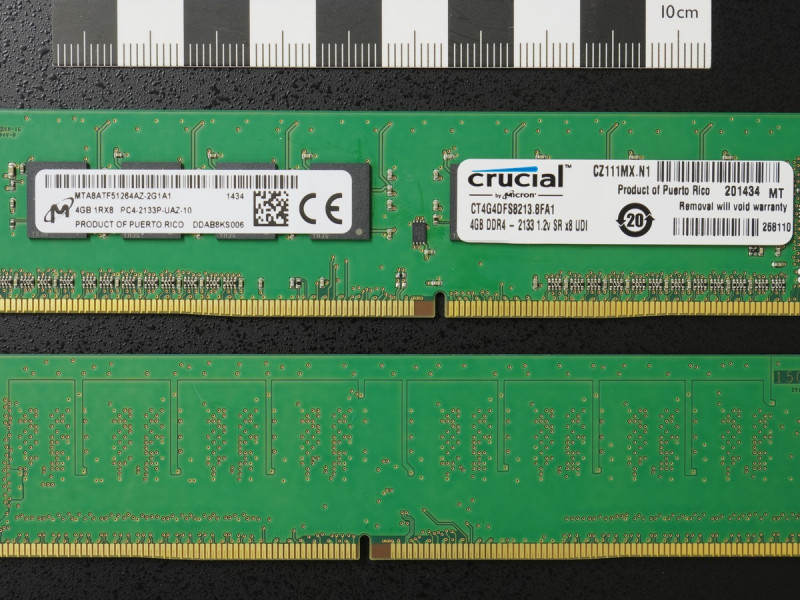
- UDIMM — unbuffered memory with no register. Found in entry-level servers on Xeon E and in workstations, limited in capacity and in modules per channel.
- RDIMM — registered. The mainstream server type: buffering the address signals allows more modules per channel and keeps stability at high speeds.
- LRDIMM — with a load-reduction buffer on the data lines. Used where maximum capacity per socket is required, because the buffer takes the load off the controller.
- MRDIMM — the new type for Xeon 6 platforms: two ranks operate alternately and speed rises to 8800 MT/s on the 6900P series and 8000 MT/s on 6700P, but only at one module per channel. It earns its place where the workload is genuinely memory-bound — analytics, inference, computation.
Types cannot be mixed. If a server holds RDIMMs, adding a UDIMM is pointless — the machine will not start. Mixing capacities and ranks within one type is sometimes technically possible, but the platform then drops the speed to the slowest module installed, and some vendors do not support such layouts at all.
The main rule: fill the channels
This is where performance is lost most often. A server processor's memory controller has several independent channels and total bandwidth is the sum of them. Leave channels empty and part of that bandwidth is physically unused, however many gigabytes sit in the machine.
| Platform | Channels per CPU | Type and speed | Sensible layout |
|---|---|---|---|
| Xeon E-2300 / E-2400 (ML30, DL20, R250, T150) | 2 | DDR4-3200 or DDR5-4800, UDIMM ECC | 2 or 4 modules, always in pairs |
| Xeon Scalable 2nd and 3rd generation (Gen10, Gen10 Plus, 14G, 15G) | 6 or 8 | DDR4-2933 / DDR4-3200 RDIMM | 6 or 8 modules per CPU |
| Xeon Scalable 4th generation, Sapphire Rapids (Gen11, 16G) | 8 | DDR5-4800 RDIMM | 8 modules per CPU |
| Xeon Scalable 5th generation, Emerald Rapids | 8 | DDR5-5600 RDIMM | 8 modules per CPU |
| Xeon 6, 6700P series (Gen12) | 8 | DDR5 up to 6400 MT/s, MRDIMM up to 8000 | 8 modules; a second row only for capacity |
| Xeon 6, 6900P series | 12 | DDR5 up to 6400 MT/s, MRDIMM up to 8800 | 12 modules per CPU |
| AMD EPYC 9004 and 9005 (DL325/DL345, R6615, R7615) | 12 | DDR5 RDIMM | 12 modules per CPU |
A worked example. A dual-socket server on 4th generation Xeon Scalable with 256 GB can be built two ways: four 64 GB modules or sixteen 16 GB modules. The capacity is identical, but the second build fills all eight channels on both processors while the first leaves half of them empty. On memory-sensitive workloads — virtualisation, databases, analytics — the difference is plainly visible and cannot be fixed by anything other than filling the empty slots.
Hence the planning rule: fill every channel with smaller modules from the start rather than installing two large ones and adding more later. Adding later often means replacing the whole set, because mixing capacities and ranks within a channel is either prohibited or drops the speed.
One DIMM per channel or two: what capacity costs
A server usually has twice as many slots as channels, so two modules per channel (2DPC) doubles capacity. The price is speed. On Xeon 6 platforms memory runs at 6400 MT/s with one module per channel and up to 5200 MT/s with two; earlier generations follow the same pattern at lower numbers. MRDIMMs do not work in 2DPC mode at all.
The rule is simple: if the workload is bandwidth-bound — analytics, inference, in-memory databases — take one row of larger modules. If it is capacity-bound — virtualisation with many machines — the second row is justified, because losing 15 to 20 % of the speed costs less than running out of memory and swapping.
Ranks and why the speed drops
- The number of ranks per channel is limited by the controller. That determines how many modules and of what kind can physically be installed — the table is in HPE QuickSpecs and in the Dell memory population guide for the specific platform.
- Speed depends on population. With every slot filled, and with multi-rank modules, memory can run below the processor's rated speed. Check this before ordering: the gap between 5600 and 4400 MT/s across eight channels is gigabytes per second.
All else being equal, dual-rank modules deliver slightly more effective bandwidth than single-rank ones thanks to bank interleaving — so between a 1Rx8 and a 2Rx8 of the same capacity and price, take the latter.
DDR4 or DDR5: no choice, but consequences
| Server generation | Memory |
|---|---|
| HPE ProLiant Gen10 / Gen10 Plus, Dell PowerEdge 14G / 15G | DDR4 |
| HPE ProLiant Gen11 and Gen12, Dell PowerEdge 16G and newer | DDR5 |
Gen10 memory will not fit a Gen11 machine — different connector, voltage and power management design, since DDR5 moves the regulator onto the module itself. Factor that into any migration plan: a stock of DDR4 does not travel to the new platform and remains useful only for the older machines.
MRDIMM: what it is and when it matters
MRDIMM (Multiplexed Rank DIMM) is a JEDEC standard for DDR5 memory in which both ranks of a module operate at the same time while a data buffer (MDB) multiplexes their traffic to the controller. The effective bus rate is twice that of a single rank: the first generation runs at 8800 MT/s on Xeon 6 6900P-series CPUs and 8000 MT/s on the 6700P series, where ordinary DDR5 RDIMMs on the same platforms top out at 6400 MT/s. The roadmap goes to 12,800 and 17,600 MT/s in later generations. Its predecessor was the MCR DIMM from Intel and SK hynix; MRDIMM is the standardised version.
What matters in practice:
- The platform has to support it. An MRDIMM does not fit any DDR5 slot: today it is supported by servers on Intel Xeon 6 with P-cores. AMD EPYC 9005 uses regular RDIMM DDR5-6400. In an unsupported server the module simply will not initialise.
- One module per channel only. MRDIMMs do not work in 2DPC mode, so capacity comes from module size: 32, 64, 96, 128 and 256 GB; the 256 GB part is a tall form factor (TFF) for 2U chassis.
- No mixing with RDIMM. Every module in the system must be the same type.
- Price. The premium over an RDIMM of the same capacity is noticeable and pays off only where memory bandwidth is the bottleneck: HPC, CPU-side AI inference, in-memory databases, analytics. Virtualisation, 1C and file servers gain nothing: there memory is limited by capacity, not speed.
Our catalogue carries DDR4 and DDR5 RDIMMs; MRDIMMs are supplied to order together with a Xeon 6 server where such memory makes sense.
Vendor modules or third-party
Modules branded by the server manufacturer pass its validation and appear correctly in the management controller (iLO, iDRAC): model, serial number, corrected error counters, failure prediction. Third-party modules from specialist memory vendors cost less and usually work fine, but:
- the management system may not show full module information, and sometimes will not inventory it at all;
- in a warranty dispute the server manufacturer will point at the non-original component;
- on new DDR5 platforms with strict compatibility tables the risk of a speed drop is higher than it was on DDR4.
A sensible approach: vendor modules in critical production, third-party in test and auxiliary systems. The same principle applies to drives.
How much memory a workload needs
- Virtualisation host: memory runs out before CPU almost every time. Take at least 30 % headroom over the calculation and allow for node failure in a cluster: in a three-node cluster each node must absorb the machines of one neighbour. A practical reference is 512 GB on a dual-socket node for 30 to 40 machines at moderate load.
- Database server: size against the active portion of the database, which should fit in memory entirely. A 200 GB database with a 60 GB working set lives happily on 128 GB.
- ERP systems: a memory shortfall shows up as "it slows down in the evening when the period is closed". For 30 to 50 users budget 64 to 128 GB, plus separate memory if the database runs on its own server. Sizing by user count is in our server for 1C article.
- Terminal server: 2 to 4 GB per active session plus memory for the operating system; this is where estimates most often come in low.
- File server and backup: modest requirements, 32 to 64 GB is enough. The main resource here is the disk subsystem.
One more calculation: hypervisor and operating system licences are counted by cores, not by memory, so adding memory is the cheapest way to raise virtual machine density per node. A licence cost comparison is in Proxmox or VMware in 2026.
What to check before ordering
- How many channels the chosen processor has and how many slots the platform physically offers — the layout is planned from channels, not from a gigabyte total.
- The speed table for 1DPC and 2DPC on the specific server model: HPE publishes it in QuickSpecs, Dell in the memory installation guide.
- Whether types and ranks would be mixed — when topping up an older server this is the first cause of a failed boot.
- Whether free slots exist at all: single-socket 1U machines often have eight, half of them already occupied.
- Whether a second processor is coming. It requires its own set of modules, because half the channels belong to it.
Ready server configurations with memory already sized are in the HPE ProLiant Gen11 and Dell PowerEdge guides. What makes up the price of a server is broken down here.
Questions and answers
Can desktop memory go into a server?
No. Server platforms require error-correcting (ECC) memory, and the larger ones require registered (RDIMM) modules that are electrically incompatible with ordinary ones. Even where a non-ECC UDIMM fits physically, the platform will either reject it or run without protection against single-bit errors — precisely the class of fault that reboots a server once a month for no visible reason.
What matters more, capacity or speed?
For virtualisation and terminal servers capacity matters more, because running short causes swapping that slows everything by multiples. For analytics, inference and databases with large scans, bandwidth matters more, which means filled channels and high speed. On an equal budget, fill every channel first and grow capacity second.
Can memory be added to a running server?
Yes, if type, rank, speed and capacity match and free slots exist in the right positions. HPE and Dell define a strict population order that is not simply left to right — install into the wrong slots and the server either ignores part of the memory or drops the speed. Send us the server model and serial number and we will check compatibility against the configuration free of charge.
Is faster memory worth it on an entry-level processor?
No: the processor's controller caps the speed, and faster modules will simply run at the platform's rated figure. Paying extra for MT/s only makes sense when both the processor and the layout — one module per channel — support it.
We will pick modules compatible with your exact platform, including the correct slot population order: write to us, info@itsmart.uz or Telegram.