In short. Speed is set by the whole chain: card, module or cable, switch port and fibre type. SFP+ means 10G, SFP28 means 25G and is backward compatible, QSFP+ means 40G and breaks out into 4 × 10G. Inside a rack a 1 to 5 metre DAC cable is cheaper and more reliable; between floors use optics — 10G reaches 300 metres on OM3 while 25G reaches only 70. Half of all "the link will not come up" cases are vendor coding in the transceiver and mismatched FEC at 25 gigabits.
Network cards and transceivers are a cheap part of a project and an easy place to lose a week: the link will not come up, the speed is wrong, the module is not detected. Here is what fits what, and the order in which to check it. Prices and specific models are collected separately in our network cards, transceivers and DAC guide.
Prices and exact models are collected separately — in the network cards, transceivers and DAC guide, while the network adapters themselves with SFP+ (often typed as «SFP plus»), SFP28 and QSFP28 ports for high-speed 100G networks are in the server network cards catalogue, with prices and stock.
Which speed you need
| Speed | Typical use | What to watch |
|---|---|---|
| 1GbE | management, auxiliary servers, small offices | no longer enough for virtualisation |
| 10GbE | the working minimum for virtualisation hosts and storage | one backup stream fills a gigabit on its own |
| 25GbE | the current choice for new projects | close to 10GbE in price with 2.5 times the headroom |
| 40/100GbE | switch trunks, hyper-converged nodes | usually overkill for server access |
On a new build, plan 25GbE at the servers and 100GbE on the trunks: the price gap against 10 and 40GbE is small and the service life is noticeably longer. The practical test that beats theoretical bandwidth is the backup window — if a full backup does not fit into the night, the bottleneck is the network.
Copper or fibre, and over what distance
- RJ45 (twisted pair). Familiar and convenient, but 10GbE over copper draws more power, adds latency and is limited in length — 30 metres on category 6 and up to 100 on 6a. It earns its place within a rack or a floor where fibre cannot be run.
- DAC cable. Copper with fixed transceivers on both ends. The cheapest option inside a rack: passive DAC works over 1 to 5 metres, active up to 10. No connector cleaning and almost no heat.
- AOC cable. An active optical cable with attached modules, good for tens of metres — convenient between adjacent racks when you would rather not assemble a link from two modules and a patch cord.
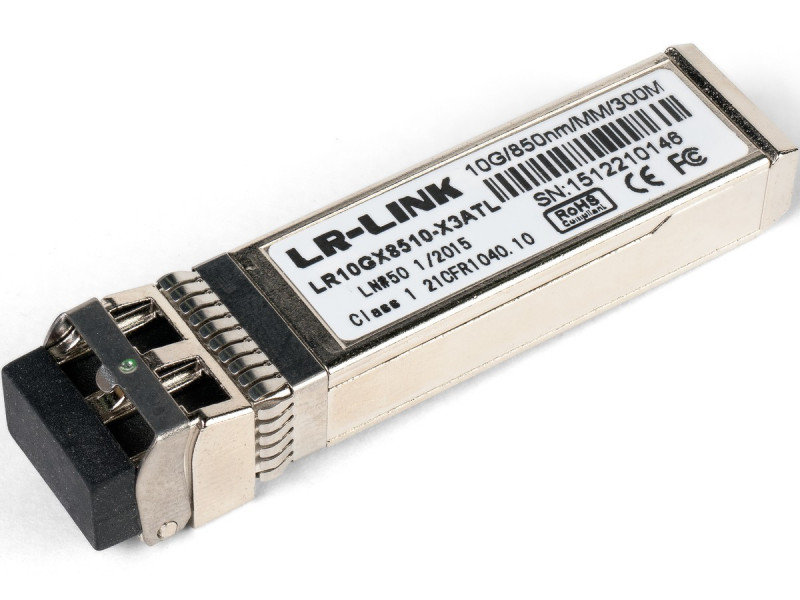
- Optics with SFP+, SFP28 or QSFP transceivers. The universal option. Multimode SR: 10G reaches 300 metres on OM3 and 400 on OM4; 25G only 70 and 100 metres; 100G SR4 up to 100 metres on OM4. Single mode LR reaches 10 kilometres.
Note the gap in reach between 10 and 25 gigabits: a route that worked happily at 10G over OM3 may not come up at all at 25G. That is a classic cause of "we only swapped the modules and everything broke".
The main trap: transceiver compatibility
Many switch vendors check the vendor identifier inside the transceiver and refuse to bring the port up with a foreign module. The practical consequences:
- A transceiver is chosen for a specific model of switch or network card, not as "just an SFP+ 10G".
- Third-party compatible modules are usually coded for the required vendor and work, but compatibility is verified before buying a batch, not after. Cisco allows third-party optics with a command, though the port then falls outside support.
- Intel X520 and X710 cards are historically fussy: some firmware brings the link up only with Intel modules or with ones explicitly permitted in the driver.
- Both ends must use the same fibre type and wavelength. A multimode module will not link to a single-mode one.
Form factors: do not mix them up
- SFP — 1G
- SFP+ — 10G
- SFP28 — 25G (physically compatible with SFP+, and the port usually understands both speeds)
- QSFP+ — 40G
- QSFP28 — 100G
A QSFP port can be split into four lower-speed lanes with a breakout cable, which is handy for attaching several servers to one high-speed switch port. The reverse is not possible: four SFP+ ports cannot be merged into a single 40-gigabit link except through link aggregation, which follows different balancing rules.
QSFP28 and 100G: when it is needed and what fits what
Questions about QSFP28 come up more often than actual 100-gigabit projects, and nearly always because of confusion with QSFP+. The connectors look identical, but the speeds differ: QSFP+ is 40G, QSFP28 is 100G. A QSFP28 port normally accepts a 40G QSFP+ module; the reverse does not work — a QSFP28 module will fit a QSFP+ port mechanically, but the link will either run at 40G or not come up at all.
A hundred gigabits belongs in three places in a corporate network: uplinks between core switches, nodes of an all-flash array or a vSAN and Ceph cluster, and GPU nodes for inference. For an ordinary virtualisation host running a couple of dozen machines it is overkill — 25G is enough there, and often 10G.
| Connector | Speed | How to connect | Typical reach |
|---|---|---|---|
| SFP+ | 10G | DAC, AOC, SR module over OM3/OM4 | DAC to 5 m, SR to 300 m on OM3 |
| SFP28 | 25G | DAC, AOC, SR module over OM4 | DAC to 5 m, SR to 70–100 m |
| QSFP+ | 40G | DAC, AOC, SR4 over MPO | SR4 to 100–150 m on OM4 |
| QSFP28 | 100G | DAC to 3–5 m, AOC to 30 m, SR4 over MPO, LR4 over single-mode | SR4 to 100 m, LR4 to 10 km |
Three practical points stall 100G projects after the purchase order has already gone out:
- The fibre connector is different. The 100G SR4 and 40G SR4 modules do not run over an LC pair but over a multi-fibre MPO-12 connector: eight fibres, four in each direction. Ordinary LC patch cords do not fit, and the route has to be designed for MPO in advance — reworking the patch panels costs more than the modules.
- PCIe lanes. A 100G card needs a PCIe 3.0 x16 or PCIe 4.0 x8 slot. In a PCIe 3.0 x8 slot it will physically work but cap out around 63 Gb/s — you pay for a hundred and get sixty. Check what slots, and at what width, the riser of that particular server provides.
- Heat. QSFP28 modules run markedly hotter than SFP+. In a densely packed 1U chassis with weak airflow the module goes into thermal protection, which looks like "the link flaps for no reason". Budget proper ventilation for 100G and do not put such cards in dead-end slots.
On breakout: a QSFP28 to 4 × SFP28 cable turns one 100G switch port into four 25G ports — that is how four servers attach to a single core port. A QSFP+ breaks out into 4 × SFP+ at 10G the same way. The reverse is not possible: four SFP+ ports do not combine into one 40-gigabit link except through link aggregation, and that is about balancing sessions rather than the speed of a single flow.
DAC cables are split by speed: 10G, 25G, 40G and 100G.
Modules in all four form factors are in stock: SFP, SFP+, SFP28 and QSFP optical modules — from 170,600 UZS for a gigabit SFP, SFP28 25G from 550,600 UZS, QSFP28 100G SR4, LR4 and BiDi from 754,100 UZS, plus DAC cables. Network cards still top out at 40G QSFP+ and 25G SFP28 — they are listed with prices here; a 100-gigabit card we source per project, together with the cabling and connector plan.
Why the link will not come up: the order of diagnosis
- Physical layer. Is the port LED on and is the module readable in the switch diagnostics (
show interface transceiverand equivalents)? A module that cannot be read is either vendor-coded or dead. - Type and speed. Do both ends agree, and is the port pinned to a fixed speed the module cannot deliver?
- Fibre. Type (OM3, OM4, single mode), route length, pair polarity and connector cleanliness. A dirty connector produces "up then down under load" rather than a clean failure.
- FEC at 25G. Error-correction negotiation between card and switch sometimes has to be configured by hand; a mismatch leaves the link down or flapping. At 10G this class of problem does not exist.
- Driver and firmware. Outdated adapter firmware is a frequent reason a new module is "invisible". Updating adapter firmware belongs in the pre-production checklist.
Choosing the card for a server
- OCP slot versus PCIe. Current HPE and Dell servers have a dedicated OCP 3.0 slot for the network adapter, which frees full-height PCIe slots for a RAID controller or GPU. The previous-generation proprietary formats — HPE FlexibleLOM (FLR) and Dell rNDC — fit only their own platforms.
- Offload. Enterprise-class cards take over part of the processing — checksums, segmentation, VXLAN tunnels — which noticeably lowers CPU load on busy virtualisation hosts.
- Hypervisor support. Check the card against your virtualisation platform's compatibility list before buying. Exotic adapters without an in-box driver are a source of unpleasant surprises at upgrade time.
- Port count. Two ports are the minimum for a resilient connection. One port means a failed cable or switch port takes the server out of service.
- Power and cooling. 25 and 100 gigabit cards run considerably hotter than gigabit ones, which matters in a short 1U chassis carrying several adapters.
A typical virtualisation host connection
Separate the traffic: management, virtual machine networks, storage, and machine migration. The separation can be physical (different ports) or logical (VLANs on shared ports), but every group needs two paths through different switches. Plugging both server ports into one switch leaves a single point of failure and negates the redundancy.
A working minimum for a cluster node: two 10 or 25 gigabit ports for data and storage with aggregation, plus two gigabit ports for management. If storage attaches over iSCSI, keep that traffic in its own VLANs and away from machine migration: a migration burst can consume the bandwidth that disk operations need, and it looks like an array problem rather than a network one.
Related reading: choosing an office switch is covered in 24 and 48-port office switches, and attaching storage over FC, iSCSI or SAS in the HPE MSA 2060 and 2062 and Dell PowerVault ME5 guides.
Questions and answers
Can a 40G QSFP+ module go into a QSFP28 port?
As a rule yes: a QSFP28 port understands both 100G and 40G. The other direction does not work — a QSFP28 module fits a QSFP+ port mechanically, but you will not get a hundred gigabits and the link may not come up at all. Always check the specific switch documentation: 40G support in QSFP28 ports is not guaranteed on every model.
What does a 100-gigabit link require?
A card with a QSFP28 port in a PCIe 3.0 x16 or PCIe 4.0 x8 slot, a QSFP28 port on the switch, and a medium: DAC up to 3–5 metres inside a rack, AOC up to 30 metres between racks, SR4 modules over an MPO-12 multi-fibre run up to 100 metres, or LR4 over single-mode up to 10 kilometres. The costliest mistake is pulling an ordinary LC pair and then discovering that SR4 needs MPO.
Can an SFP28 module go into an SFP+ port?
It fits physically, but the link comes up at ten gigabits because the port sets the limit. The reverse combination works normally — an SFP28 card handles an SFP+ module at 10G — and that is a convenient migration path: cards at 25G first, switches later.
How does DAC differ from AOC, and which should I choose?
DAC is copper with fixed modules: cheap but short, 1 to 5 metres passive. AOC is an optical cable with attached modules that runs for tens of metres at a higher price. Inside a rack take DAC; between racks take AOC, or two modules and a patch cord if the route follows cable trays.
Must transceivers match the switch brand?
Not necessarily, but compatibility has to be verified before buying a batch. Compatible modules are coded for a specific vendor and work in most cases; the risk is that behaviour can change after a switch firmware update. For a critical segment prefer vendor optics, for a test one third-party is fine.
How many ports does a virtualisation host need?
At least four: two at 10 or 25 gigabits for data and storage plus two gigabit ports for management, with each pair going to different switches. A single dual-port adapter also works, but its failure takes the node down entirely, so critical clusters use two cards.
We will select network adapters and compatible transceivers for your equipment, verified against your switch and server models: write to us, info@itsmart.uz or Telegram. Prices and availability are in the network cards and transceivers section.